
what is the best ai accounting tax software
Let’s be honest — taxes can make even the most organized freelancer break into a cold sweat. Between tracking expenses, filing quarterly payments, and worrying about IRS forms, you might wonder: Isn’t there an easier way to handle all this?
The answer is yes — with the right tax software for freelancers. But choosing the right one isn’t as simple as clicking “buy.” Some tools automate everything, others focus on deductions, and some cater specifically to self-employed individuals.
In this guide, we’ll walk through how to choose the best tax software for your freelance business, what features actually matter, and which programs will save you time, stress, and possibly hundreds in taxes.
Why Freelancers Need Specialized Tax Software
Freelancers aren’t like traditional employees. There’s no HR department to withhold taxes, issue W-2s, or track deductions for you.
You’re responsible for:
- Calculating your income tax and self-employment tax (15.3%)
- Paying quarterly estimated taxes
- Tracking expenses and receipts
- Managing 1099-NEC forms
Without the right software, that can quickly become overwhelming.
Resource: Learn how taxes work in detail in Freelance Taxes 101: Everything You Need to Get Started.
What Tax Software Does for Freelancers
The best tax software should act as your virtual accountant. It helps you:
- Track income and expenses automatically
- Estimate quarterly taxes
- Import 1099 forms directly
- Identify deductions
- File both federal and state taxes
Essentially, it removes guesswork — which means fewer mistakes and fewer penalties.
Reference: IRS Estimated Taxes for Individuals (Form 1040-ES).
Key Features to Look For
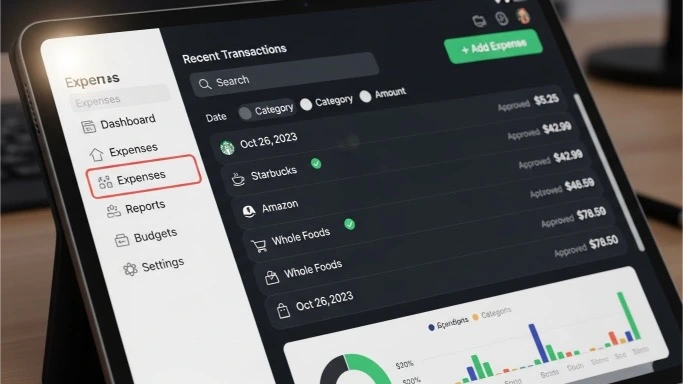
When comparing tax tools, look beyond flashy marketing. The following features actually matter for freelancers:
– 1. Self-Employment Tax Support
Your software must calculate Social Security and Medicare contributions correctly. Many general tax tools don’t account for the 15.3% self-employment rate.
– 2. Expense Tracking
Choose a tool that connects to your bank accounts or lets you upload receipts easily. Automatic categorization can save hours during tax season.
– 3. Quarterly Tax Reminders
The IRS expects four payments a year — missing one can cost you. The software should remind you before each due date.
– 4. Deduction Finder
The right tool will flag deductible expenses such as office supplies, software, and mileage — maximizing your savings.
For example, tools like QuickBooks Self-Employed and TaxAct Freelancer Edition include smart deduction scanning.
– 5. State Tax Filing
If your state has income tax, make sure your software supports state filing — not all do.
Top Software Options for Freelancers
Let’s explore the best options for different needs — whether you want simplicity, automation, or affordability.
1. TurboTax Self-Employed
- Best for: All-in-one guidance and live support
- Highlights:
- Imports 1099 forms automatically
- Tracks mileage and expenses
- Includes on-demand tax expert access
2. QuickBooks Self-Employed
- Best for: Continuous bookkeeping and tax tracking
- Highlights:
- Syncs with your bank accounts
- Auto-categorizes expenses
- Estimates quarterly taxes automatically
- Integrates seamlessly with TurboTax
Use it alongside our Freelance Tax Calculator for fast, accurate estimates.
QuickBooks Self-Employed Review — Intuit.
3. H&R Block Self-Employed
- Best for: Freelancers who want both software and in-person help
- Highlights:
- Simple dashboard
- Human support available at local branches
- Deduction help for small business expenses
H&R Block Self-Employed Edition.
4. TaxAct Freelancer Edition
- Best for: Budget-conscious freelancers
- Highlights:
- Affordable pricing
- Step-by-step walkthrough for 1099 income
- Real-time refund estimator
5. FreeTaxUSA Self-Employed
- Best for: Advanced filers who don’t need extra support
- Highlights:
- Free federal filing
- Low-cost state returns
- Clean interface
FreeTaxUSA — Self-Employed Filers.
How to Compare Software (Step-by-Step)
When you’re ready to pick, follow this process:
Step 1: Identify Your Needs
Do you need live support or automation? Are you okay doing it yourself, or do you want human guidance?
Step 2: Set Your Budget
Software ranges from $0 to $150+ per year. Higher-priced tools usually include expert access or built-in bookkeeping.
Step 3: Test Drive the Free Version
Most major tools offer free trials or previews. Use them to see which interface feels most intuitive.
Step 4: Ensure Integration
If you already use a bookkeeping app (like Wave or FreshBooks), choose tax software that integrates seamlessly.
For related reading, check out: The Easiest Way to Track Tax-Deductible Expenses.
Don’t Forget About Quarterly Payments
Even with the best tax software, you’re still responsible for quarterly estimated payments.
The IRS requires freelancers to pay taxes four times a year — in April, June, September, and January.
Many tax programs (like QuickBooks and TurboTax) automatically calculate and remind you before each deadline.
For guidance, read How to Pay Estimated Taxes Without Stress.
External reference: IRS Payment Portal — Direct Pay.
The Importance of Security and Data Privacy
Tax software handles sensitive information — your income, bank accounts, and Social Security number.
Always choose programs that:
- Use two-factor authentication
- Offer encrypted cloud storage
- Have a solid privacy reputation
Reference: FTC Guide — Protecting Tax Data Online.
When to Upgrade from Software to a CPA
If your freelance income exceeds $100,000, or you operate multiple business streams, consider hiring a CPA.
Why?
- They can optimize deductions across income sources.
- They understand complex multi-state filings.
- They provide audit protection and year-round advice.
You can still use software to organize data before handing it off to your CPA — saving both time and money.
How to Avoid IRS Penalties as a Freelancer.
Keep Stress Low During Tax Season

Even with the right software, the real secret to calm tax management is mindset and routine.
Here’s a system that works:
- Set a recurring reminder to log expenses every Friday.
- Use your software’s mobile app to scan receipts on the go.
- Review reports monthly — not just at tax time.
And for emotional balance during high-stress weeks, explore SelfWorthSelfLove.com for wellness strategies that keep your motivation high.
The bottom line: The Right Software Turns Tax Season Into Routine
You don’t have to dread freelance tax season anymore. With the right software, you can automate calculations, track deductions, and file confidently — all without hiring an accountant.
Whether you go with TurboTax, QuickBooks, or another trusted platform, remember this: the best software is the one you’ll actually use consistently.Start today by estimating your taxes with our Freelance Tax Calculator — then choose the software that helps you simplify your freelance life.